ArcGIS for Desktop

  • Documentation
  • Pricing
  • Support

  • My Profile
  • Help
  • Sign Out
ArcGIS for Desktop

ArcGIS Online

The mapping platform for your organization

ArcGIS for Desktop

A complete professional GIS

ArcGIS for Server

GIS in your enterprise

ArcGIS for Developers

Tools to build location-aware apps

ArcGIS Solutions

Free template maps and apps for your industry

ArcGIS Marketplace

Get apps and data for your organization

  • Documentation
  • Pricing
  • Support
Esri
  • Sign In
user
  • My Profile
  • Sign Out

Help

  • Home
  • Get Started
  • Map
  • Analyze
  • Manage Data
  • Tools
  • More...

Batch Tasks

  • About

About

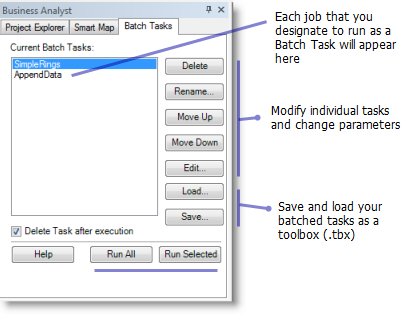
Batch Tasks allow you to execute your work in a grouped manner. For example, instead of individually running a large geocoding job, building nationwide trade areas, and creating demographic reports, you can set the processes to run back-to-back at a later time. This has many advantages because you can continue to work with Business Analyst and let your more intense processing jobs run at a more opportune time, such as in the evening.

Access the Batch Tasks from the Business Analyst tabs section.
Batch Tasks
Tip:

Task names must be contiguous without character spaces. For example, Simple Rings is incorrect; SimpleRings is correct.

Tip:

Consider saving your tasks as a toolbox (.tbx). This consolidation allows you to load the Batch Task at anytime or share with coworkers.

Feedback on this topic?

ArcGIS for Desktop

  • Home
  • Documentation
  • Pricing
  • Support

ArcGIS Platform

  • ArcGIS Online
  • ArcGIS for Desktop
  • ArcGIS for Server
  • ArcGIS for Developers
  • ArcGIS Solutions
  • ArcGIS Marketplace

About Esri

  • About Us
  • Careers
  • Insiders Blog
  • User Conference
  • Developer Summit
Esri
© Copyright 2016 Environmental Systems Research Institute, Inc. | Privacy | Legal