サマリー
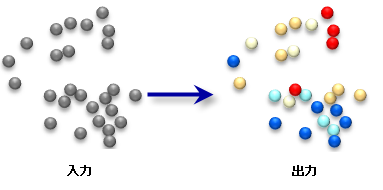
コールド(青色)/ホット(赤色)カラー レンダリング スキーマを Z スコアのフィールドに適用します。
図
使用法
Z レンダラは、Z スコアが次のようにレンダリングされている新しいレイヤ ファイル(*.lyr)を作成します。
- 標準偏差が -2 より小さい Z スコアは濃い青色
- 標準偏差が -2 と -1 の間である Z スコアは淡い青色
- 標準偏差が – 1 と +1 の間である Z スコアは中間色
- 標準偏差が 1 と 2 の間である Z スコアは桃色
- 標準偏差が 2 より大きい Z スコアは濃い赤色
Z レンダラは、[ホット スポット分析(Hot Spot Analysis(Getis-Ord Gi*))] ツールと [クラスタ/外れ値分析(Cluster and Outlier Analysis(Anselin Local Morans I))] ツールの両方の出力を含む標準偏差をシンボル表示するために適切です。
-
マップ レイヤーを使用して、入力フィーチャクラスを指定できます。解析対象として指定したレイヤーの中で何らかのフィーチャが選択されている場合、選択されているフィーチャだけが解析の対象となります。
構文
ZRenderer_stats (input_feature_class, field_to_render, output_layer_file)
| パラメーター | 説明 | データ タイプ |
input_feature_class | 標準化された Z スコアのフィールドが含まれているフィーチャクラス。 | Feature Layer |
field_to_render | Z スコアが含まれているフィールドの名前。 | Field |
output_layer_file | レンダリング情報を格納する新しい出力レイヤ ファイル。ファイル名の一部として、*.lyr 拡張子を含める必要があります。 | Layer File |
コードのサンプル
Z スコア レンダリング処理(ZScore Rendering)ツールの例(Python ウィンドウ)
次の Python ウィンドウのスクリプトは、[Z スコア レンダリング処理(ZScore Rendering)] ツールを使用する方法を示しています。
import arcpy
arcpy.env.workspace = r"C:\data"
arcpy.ZRenderer_stats("hotspot_output.shp", "GiInvDst", "hotspot_output_rendered.lyr")
Z スコア レンダリング処理(ZScore Rendering)ツールの例(スタンドアロン Python スクリプト)
次のスタンドアロン Python スクリプトは、[Z スコア レンダリング処理(ZScore Rendering)] ツールを使用する方法を示しています。
# Perform Hot Spot Analysis for assault incidents

# Import system modules
import arcpy

# Local variables...
workspace = r"C:\data"
input = "assaults.shp"
collect_output = "collect_output.shp"
collect_count_field = "Count"
hotspot_output = "hotspot_output.shp"
hotspot_output_rendered = "hotspot_output_rendered.lyr"
z_score_field_name = "GiInvDst"

try:
    # Set the current workspace (to avoid having to specify the full path to the feature classes each time)
    arcpy.env.workspace = workspace

    # Convert assault incidents into weighted point data
    # Process: Collect Events...
    arcpy.CollectEvents_stats(input, collect_output)

    # Calculate Getis-Ord Gi* statistic
    # Process: Hot Spot Analysis (Getis-Ord Gi*)...
    arcpy.HotSpots_stats(collect_output, collect_count_field, hotspot_output, "INVERSE_DISTANCE", "EUCLIDEAN_DISTANCE", "NONE", "#", "#", "#")

    # Render hot spot analysis
    # Process: ZScore Rendering...
    arcpy.ZRenderer_stats(hotspot_output, z_score_field_name, hotspot_output_rendered)

except:
    # If an error occurred when running the tool, print out the error message.
    print arcpy.GetMessages(2)
環境
ライセンス情報
- ArcGIS Desktop Basic: はい
- ArcGIS Desktop Standard: はい
- ArcGIS Desktop Advanced: はい