Overview
Component Geographies are boundaries selected within larger boundaries, for example, block groups inside a drive-time boundary.
Some examples include:
- Create an output feature class that includes all the ZIP Codes that intersect a drive-time trade area.
- Create a trade area of all the counties within a given state. In most cases, the correspondence between a parent and child geography is a strict hierarchical, one-to-many relationship.
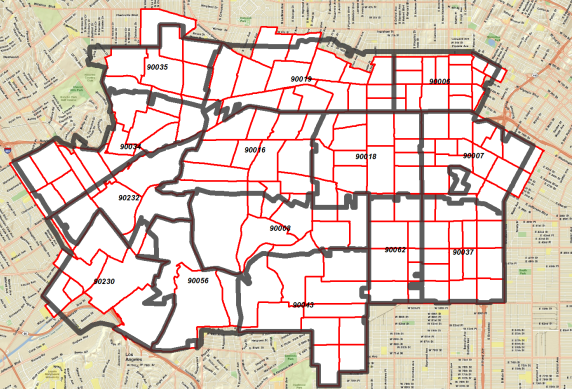
The image below is a typical output with the US Census Tracts represented in red and their centroid within ZIP Codes in black. You can automatically calculate the area, demographic and business ratios of component geographies.
Calculating Ratios
The Find Component Geographies tool gives you the option to calculate the statistical ratios of the underlying geographies. For example, you create component geographies of all ZIP Codes within a county. You can use the Calculate Ratios option to determine what percentage of ZIP Codes exists within the county boundary. Ratios for population, households, housing units, business counts, and general area can be generated. The ratio output appears in the trade area attribute table.
You can calculate ratios in the following ways:
- Area ratios only: This method means that a percentage will be calculated only where subgeographies intersect the boundary layer (for example, the percentage of area for each ZIP Code boundary within a county boundary).
- Area ratios plus population, housing units, and businesses: This method means that a percentage will be calculated only where component geographies intersect the boundary layer (for example, percentage of area for each ZIP Code boundary within a county boundary).
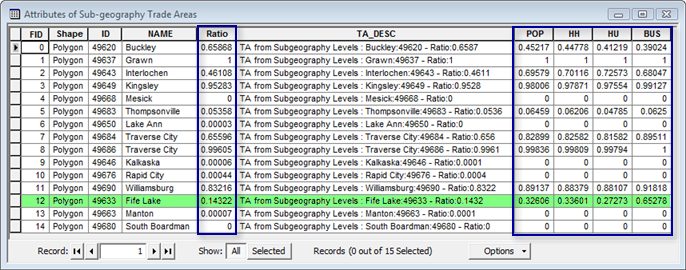
The image below shows an attribute table with all of the ratios option for ZIP Code within a county. In the Ratio field, the Buckley ZIP Code is 65.8% contained in the county boundary. The Grawn ZIP Code is 100% contained in the county boundary. The Mesick ZIP Code is 0% contained in the boundary. It can be zero percent because the ZIP Code boundary touches or intersects the county border but is not within the county. The ratio fields are POP (Population), HH (Households), HU (Housing Units) and BUS (Business Counts). For example, the county claims only 14.3% of the Fife lake ZIP Code, highlighted in green, in terms of its total area but 32.6% of its population resides within the county as does 33.6% of total households.
Component geographies can be created using these different selection methods:
- Interest
- Centroid Within
- Completely Within
Learn more about Find Component Geographies (Subgeography).