サマリー
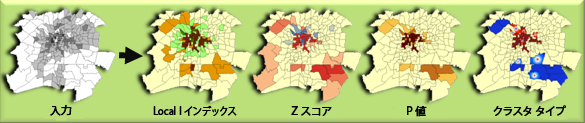
一連の重み付きフィーチャを指定すると、Anselin Local Moran's I 統計を使用してホット スポット、コールド スポット、および空間外れ値を識別します。Z スコアの結果に応じて、コールド - ホット レンダリング処理を行います。
図
使用法
[Z スコア レンダリング処理を含むクラスター/外れ値分析(Cluster/Outlier Analysis with Rendering)] ツールは、[クラスター/外れ値分析(Cluster and Outlier Analysis(Anselin Local Morans I))] ツールと [Z スコア レンダリング処理(ZScore Rendering)] ツールをモデルで組み合わせたものです。ホット/コールド レンダリングがフィーチャの Z スコアに適用されると、[出力レイヤー ファイル] が自動的にコンテンツ ウィンドウに追加されます。
ArcGIS 9.3 より、デフォルトのレンダリングが [COTYPE] フィールドに適用されると、[クラスター/外れ値分析(Cluster and Outlier Analysis(Anselin Local Morans I))] ツールの出力が自動的にコンテンツ ウィンドウに追加されるようになり、統計的に有意なホット スポット、コールド スポット、および空間外れ値が表示されるようになりました。
構文
ClustersOutliersRendered_stats (Input_Feature_Class, Input_Field, Output_Layer_File, Output_Feature_Class)
| パラメーター | 説明 | データ タイプ |
Input_Feature_Class | クラスター分析が実行されるフィーチャクラス。 | Feature Layer |
Input_Field | 評価されるフィールド。 | Field |
Output_Layer_File | レンダリング情報を格納する出力レイヤー ファイル。 | Layer File |
Output_Feature_Class | 結果のフィールド、Z スコア、P 値、およびクラスター タイプの指定を取得するための出力フィーチャクラス。 | Feature Class |
コードのサンプル
Z スコア レンダリング処理を含むクラスター/外れ値分析 (Cluster/Outlier Analysis with Rendering) ツールの例 (Python ウィンドウ)
次の Python ウィンドウ スクリプトは、[Z スコア レンダリング処理を含むクラスター/外れ値分析 (Cluster/Outlier Analysis with Rendering)] ツールを使用する方法を示しています。
import arcpy
arcpy.env.workspace = "c:/data/911calls"
arcpy.ClustersOutliersRendered_stats("911Count.shp", "ICOUNT","911ClusterOutlier_rendered.lyr", "911ClusterOutlier.shp")
Z スコア レンダリング処理を含むクラスター/外れ値分析 (Cluster/Outlier Analysis with Rendering) ツールの例 (スタンドアロン Python スクリプト)
次のスタンドアロン Python スクリプトは、[Z スコア レンダリング処理を含むクラスター/外れ値分析 (Cluster/Outlier Analysis with Rendering)] ツールを使用する方法を示しています。
# Analyze the spatial distribution of 911 calls in a metropolitan area
# using the Cluster-Outlier Analysis with Rendering Tool (Anselin's Local Moran's I)
# Import system modules
import arcpy
# Set geoprocessor object property to overwrite outputs if they already exist
arcpy.gp.OverwriteOutput = True
# Local variables...
workspace = r"C:\Data\911Calls"
try:
    # Set the current workspace (to avoid having to specify the full path to the feature classes each time)
    arcpy.env.workspace = workspace
    # Copy the input feature class and integrate the points to snap
    # together at 500 feet
    # Process: Copy Features and Integrate
    cf = arcpy.CopyFeatures_management("911Calls.shp", "911Copied.shp",
                         "#", 0, 0, 0)
    integrate = arcpy.Integrate_management("911Copied.shp #", "500 Feet")
    # Use Collect Events to count the number of calls at each location
    # Process: Collect Events
    ce = arcpy.CollectEvents_stats("911Copied.shp", "911Count.shp", "Count", "#")
    # Cluster/Outlier Analysis of 911 Calls
    # Process: Local Moran's I
    clusters = arcpy.ClustersOutliersRendered_stats("911Count.shp", "ICOUNT",
                        "911ClusterOutlier_rendered.lyr", "911ClusterOutlier.shp")
except:
    # If an error occurred when running the tool, print out the error message.
    print arcpy.GetMessages()
環境
ライセンス情報
- ArcGIS Desktop Basic: はい
- ArcGIS Desktop Standard: はい
- ArcGIS Desktop Advanced: はい