ArcGIS Desktop

  • Documentation
  • Support

  • My Profile
  • Help
  • Sign Out
ArcGIS Desktop

ArcGIS Online

The mapping platform for your organization

ArcGIS Desktop

A complete professional GIS

ArcGIS Enterprise

GIS in your enterprise

ArcGIS for Developers

Tools to build location-aware apps

ArcGIS Solutions

Free template maps and apps for your industry

ArcGIS Marketplace

Get apps and data for your organization

  • Documentation
  • Support
Esri
  • Sign In
user
  • My Profile
  • Sign Out

Help

  • Home
  • Get Started
  • Map
  • Analyze
  • Manage Data
  • Tools
  • More...

Identifying route locations

You can identify route locations on the map and view their measure values and attributes in the Roadway Characteristics Editor.

  1. Open a web browser and start the Roadway Characteristics Editor application.
  2. On the Map tab, in the Identify group, click the Identify Route Locations button Identify Route Locations.
  3. Click a route in the map to identify it and view its attributes.
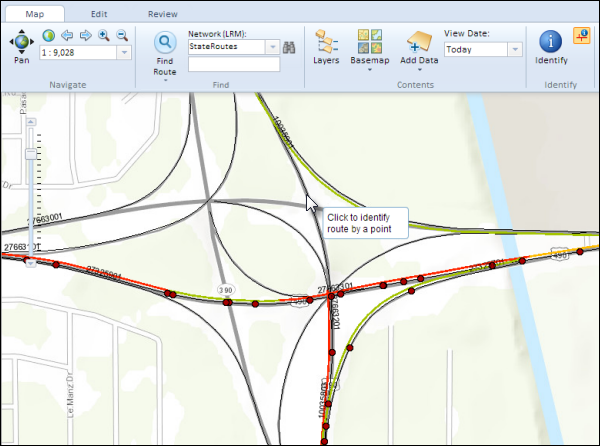
    Identifying routes on the map

    The identified routes are highlighted in yellow and their attributes are shown in the Route Locations window. Information on the measure value at the point location on the route and the minimum and the maximum measure values for the route are displayed.
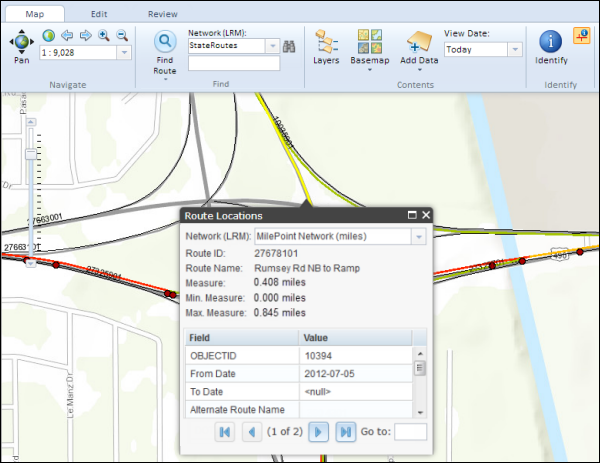
    The result of the Identify Route Locations tool
    Note:

    If more than one route exists in the point location clicked on the map, use the page navigation tools provided at the bottom of the Route Locations window to view another identified feature.

    Viewing results in the Route Locations window

ArcGIS Desktop

  • Home
  • Documentation
  • Support

ArcGIS Platform

  • ArcGIS Online
  • ArcGIS Desktop
  • ArcGIS Enterprise
  • ArcGIS for Developers
  • ArcGIS Solutions
  • ArcGIS Marketplace

About Esri

  • About Us
  • Careers
  • Esri Blog
  • User Conference
  • Developer Summit
Esri
Tell us what you think.
Copyright © 2018 Esri. | Privacy | Legal